About LiDAR View
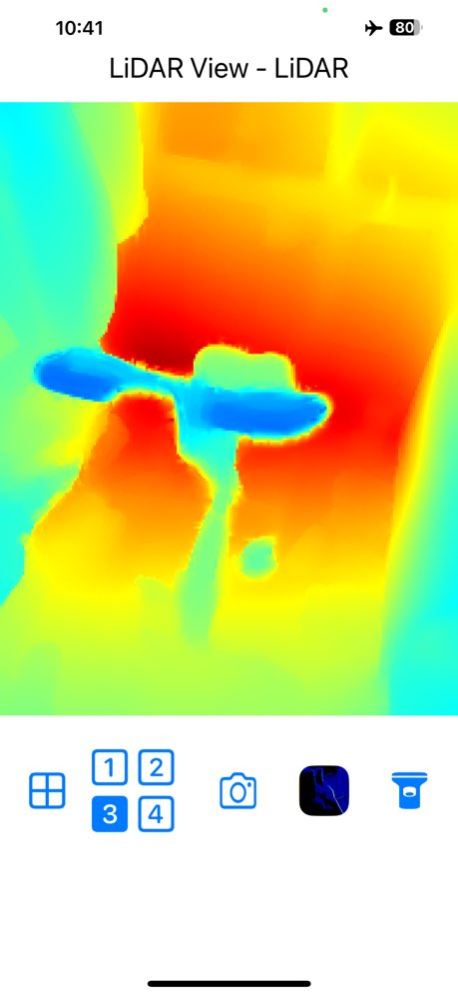
LiDAR View provides real-time visualization of both LiDAR depth data and camera imagery. You can choose to display the camera view, the LiDAR view, or a combined view that merges both sources for enhanced environmental...
LiDAR View provides real-time visualization of both LiDAR depth data and camera imagery. You can choose to display the camera view, the LiDAR view, or a combined view that merges both sources for enhanced environmental awareness and depth perception. * LiDAR modes (Options 3 and 4) are especially effective in low-light or dark environments, helping reveal surrounding structures and spatial depth. The visible range can be adjusted using the slider at the bottom of the screen. * Combined modes (Options 2 and 4) blend camera and LiDAR data to enhance object contours and depth details. * In Combined modes, tap the subview to enlarge it for a more detailed inspection. Tap the enlarged view again to return to the combined layout. * The center-point depth is displayed in real time in centimeters. You can capture screenshots at any time by tapping the camera icon, and browse saved images through the photo icon. The built-in flashlight can be enabled using the torch icon. Swipe left on the number icon to access two additional viewing modes: * 3D Point Cloud View - Freely explore the surrounding environment in an interactive 3D perspective by panning the screen. * Stereo View - Experience immersive real-time stereo visualization using Google Cardboard or a compatible VR headset. If you want to view front depth image through TrueDepth camera and front camera, please check our app "FrontDepth View". If you have any suggestions, feedback, or feature requests, feel free to contact us at hereyouare1981@gmail.com Thank you for using LiDAR View!
Version History Keep Screen Always On 3.3 Aug 17 Removed the exposure adjustment feature to prevent crashes on some devices. 3.2 Jun 30 Update user interface and description 3.0 Jun 2 Update app icon and description 2.6 May 28 Add camera exposure bias adjustment function in Camera / Camera Contour view. 2.4 May 12 Add view range slider function. 2.3 Mar 26 Resolve the unsupported device issue on various iPad Pro models. It is now compatible with all iPad Pro models featuring LiDAR. 2.1 05/20/2025 Show unsupported messages for devices that do not have LiDAR capabilities. 2.0 03/28/2025 Update libraries 1.9 03/24/2025 Add thumbnail image after taking photos. Add swipe left/right gesture to change photos in photo browsing page. Add depth change bar in stereo view. 1.8 03/13/2025 Add a 3D Point Cloud View (pan to change viewpoint) and a Stereo View (use Google Cardboard or a similar device). When you scroll to the left on the number icon, two additional options will appear. 1.7 03/07/2025 Add saved image browser function and update user interface. 1.4 11/24/2024 Add take photo function. 1.3 12/07/2023 Add iPad Pro support. 1.2 09/27/2023 1.1 09/15/2023
Previous Versions
Here you can find the changelog of LiDAR View since it was posted on our website on 2026-02-01 06:20:50.
The latest version is 3.3 and it was updated on 2026-10-10 09:32:57. See below the changes in each version.
LiDAR View version 3.3
Updated At: 2026-10-08
Changes: Version History Keep Screen Always On 3.3 Aug 17 Removed the exposure adjustment feature to prevent crashes on some devices. 3.2 Jun 30 Update user interface and description 3.0 Jun 2 Update app icon and description 2.6 May 28 Add camera exposure bias adjustment function in Camera / Camera Contour view. 2.4 May 12 Add view range slider function. 2.3 Mar 26 Resolve the unsupported device issue on various iPad Pro models. It is now compatible with all iPad Pro models featuring LiDAR. 2.1 05/20/2025 Show unsupported messages for devices that do not have LiDAR capabilities. 2.0 03/28/2025 Update libraries 1.9 03/24/2025 Add thumbnail image after taking photos.
Add swipe left/right gesture to change photos in photo browsing page.
Add depth change bar in stereo view. 1.8 03/13/2025 Add a 3D Point Cloud View (pan to change viewpoint) and a Stereo View (use Google Cardboard or a similar device).
When you scroll to the left on the number icon, two additional options will appear. 1.7 03/07/2025 Add saved image browser function and update user interface. 1.4 11/24/2024 Add take photo function. 1.3 12/07/2023 Add iPad Pro support. 1.2 09/27/2023 1.1 09/15/2023
LiDAR View version 3.3
Updated At: 2026-08-21
Changes: Version History Keep Screen Always On 3.3 3d ago Removed the exposure adjustment feature to prevent crashes on some devices. 3.2 Jun 30 Update user interface and description 3.0 Jun 2 Update app icon and description 2.6 May 28 Add camera exposure bias adjustment function in Camera / Camera Contour view. 2.4 May 12 Add view range slider function. 2.3 Mar 26 Resolve the unsupported device issue on various iPad Pro models. It is now compatible with all iPad Pro models featuring LiDAR. 2.1 05/20/2025 Show unsupported messages for devices that do not have LiDAR capabilities. 2.0 03/28/2025 Update libraries 1.9 03/24/2025 Add thumbnail image after taking photos.
Add swipe left/right gesture to change photos in photo browsing page.
Add depth change bar in stereo view. 1.8 03/13/2025 Add a 3D Point Cloud View (pan to change viewpoint) and a Stereo View (use Google Cardboard or a similar device).
When you scroll to the left on the number icon, two additional options will appear. 1.7 03/07/2025 Add saved image browser function and update user interface. 1.4 11/24/2024 Add take photo function. 1.3 12/07/2023 Add iPad Pro support. 1.2 09/27/2023 1.1 09/15/2023
LiDAR View version 3.2
Updated At: 2026-07-24
Changes: Version History Removed the exposure adjustment feature to prevent crashes on some devices. 3.2 Jun 30 Update user interface and description 3.0 Jun 2 Update app icon and description 2.6 May 28 Add camera exposure bias adjustment function in Camera / Camera Contour view. 2.4 May 12 Add view range slider function. 2.3 Mar 26 Resolve the unsupported device issue on various iPad Pro models. It is now compatible with all iPad Pro models featuring LiDAR. 2.1 05/20/2025 Show unsupported messages for devices that do not have LiDAR capabilities. 2.0 03/28/2025 Update libraries 1.9 03/24/2025 Add thumbnail image after taking photos.
Add swipe left/right gesture to change photos in photo browsing page.
Add depth change bar in stereo view. 1.8 03/13/2025 Add a 3D Point Cloud View (pan to change viewpoint) and a Stereo View (use Google Cardboard or a similar device).
When you scroll to the left on the number icon, two additional options will appear. 1.7 03/07/2025 Add saved image browser function and update user interface. 1.4 11/24/2024 Add take photo function. 1.3 12/07/2023 Add iPad Pro support. 1.2 09/27/2023 1.1 09/15/2023
LiDAR View version 3.2
Updated At: 2026-07-06
Changes: Version History Removed the exposure adjustment feature to prevent crashes on some devices. 3.2 5d ago Update user interface and description 3.0 Jun 2 Update app icon and description 2.6 May 28 Add camera exposure bias adjustment function in Camera / Camera Contour view. 2.4 May 12 Add view range slider function. 2.3 Mar 26 Resolve the unsupported device issue on various iPad Pro models. It is now compatible with all iPad Pro models featuring LiDAR. 2.1 05/20/2025 Show unsupported messages for devices that do not have LiDAR capabilities. 2.0 03/28/2025 Update libraries 1.9 03/24/2025 Add thumbnail image after taking photos.
Add swipe left/right gesture to change photos in photo browsing page.
Add depth change bar in stereo view. 1.8 03/13/2025 Add a 3D Point Cloud View (pan to change viewpoint) and a Stereo View (use Google Cardboard or a similar device).
When you scroll to the left on the number icon, two additional options will appear. 1.7 03/07/2025 Add saved image browser function and update user interface. 1.4 11/24/2024 Add take photo function. 1.3 12/07/2023 Add iPad Pro support. 1.2 09/27/2023 1.1 09/15/2023
LiDAR View version 3.0
Updated At: 2026-06-29
Changes: Version History Update user interface and description 3.0 Jun 2 Update app icon and description 2.6 May 28 Add camera exposure bias adjustment function in Camera / Camera Contour view. 2.4 May 12 Add view range slider function. 2.3 Mar 26 Resolve the unsupported device issue on various iPad Pro models. It is now compatible with all iPad Pro models featuring LiDAR. 2.1 05/20/2025 Show unsupported messages for devices that do not have LiDAR capabilities. 2.0 03/28/2025 Update libraries 1.9 03/24/2025 Add thumbnail image after taking photos.
Add swipe left/right gesture to change photos in photo browsing page.
Add depth change bar in stereo view. 1.8 03/13/2025 Add a 3D Point Cloud View (pan to change viewpoint) and a Stereo View (use Google Cardboard or a similar device).
When you scroll to the left on the number icon, two additional options will appear. 1.7 03/07/2025 Add saved image browser function and update user interface. 1.4 11/24/2024 Add take photo function. 1.3 12/07/2023 Add iPad Pro support. 1.2 09/27/2023 1.1 09/15/2023
LiDAR View version 2.4
Updated At: 2026-05-28
Changes: Version History Add camera exposure bias adjustment function in Camera / Camera Contour view. 2.4 May 12 Add view range slider function. 2.3 Mar 26 Resolve the unsupported device issue on various iPad Pro models. It is now compatible with all iPad Pro models featuring LiDAR. 2.1 05/20/2025 Show unsupported messages for devices that do not have LiDAR capabilities. 2.0 03/28/2025 Update libraries 1.9 03/24/2025 Add thumbnail image after taking photos.
Add swipe left/right gesture to change photos in photo browsing page.
Add depth change bar in stereo view. 1.8 03/13/2025 Add a 3D Point Cloud View (pan to change viewpoint) and a Stereo View (use Google Cardboard or a similar device).
When you scroll to the left on the number icon, two additional options will appear. 1.7 03/07/2025 Add saved image browser function and update user interface. 1.4 11/24/2024 Add take photo function. 1.3 12/07/2023 Add iPad Pro support. 1.2 09/27/2023 1.1 09/15/2023
LiDAR View version 2.1
Updated At: 2025-05-20
Changes: Resolve the unsupported device issue on various iPad Pro models. It is now compatible with all iPad Pro models featuring LiDAR.
LiDAR View version 2.3
Updated At: 1970-01-01
Changes: Add view range slider function.
Disclaimer
Official App Store Link
We do not host LiDAR View on our servers. We did not scan it for viruses, adware, spyware or other type of malware. This app is hosted by Apple and passed their terms and conditions to be listed there. We recommend caution when installing it.
The App Store link for LiDAR View is provided to you by apps112.com without any warranties, representations or guarantees of any kind, so access it at your own risk.
If you have questions regarding this particular app contact the publisher directly. For questions about the functionalities of apps112.com contact us.